
There is a small pocket gadget on my desk, sold online as an "AI companion," that now runs entirely on my own hardware. I did not set out to build that. I set out to buy a decent little voice assistant, and what showed up was underwhelming and barely worked, leaning on buggy cloud software I did not trust and firmware I trusted less. My unit was defective on arrival. So was a friend's, which reads as a quality-control problem rather than bad luck. When the company started giving us the runaround on a replacement, I stopped waiting and decided the hardware could at least be useful on my own terms. Now the device hears me locally, an always-on mini-PC in my closet transcribes the audio and synthesizes the reply, and the actual thinking happens on my desktop GPU running an open model behind vLLM. Every byte of the conversation stays on my home network. No vendor cloud, no account, no subscription, and no company on the other end of my microphone.
Out of the box, it does none of that. It works after a fashion: a mic, a tiny speaker, a little color screen, and a WiFi link that hands your voice to an LLM in the vendor's cloud. To the company's credit they are not a walled garden about it, they run a maker community and the board itself is unusually open. But the stock setup still routes everything through them, and the hardware underneath is well understood and fully reflashable over USB-C, which means everything about where it phones home is yours to change.
So I changed it. This post walks through the full conversion: backing up the stock firmware completely, building the open firmware the device already runs with the exact ESP-IDF version it wants, baking my own server address into the image, and standing up a self-hosted voice pipeline that pairs a weak-but-always-on mini-PC for hearing and speaking with a GPU box for the heavy inference. The result is a cheap, cheerful little assistant that answers from a model I chose, on machines I own. If you care about who is listening in your house, that is worth an afternoon.
What the gadget actually is
The AIPI Lite sells as a pocket AI companion. You talk to it, the vendor's cloud talks back, and a subscription keeps the arrangement alive.
The internals are more interesting than the pitch. The board is an ESP32-S3 with 16MB of flash and 8MB of PSRAM, wired to an ES8311 audio codec. That exact combination happens to be a standard target for xiaozhi-esp32, a widely used open-source voice-assistant firmware for Espressif chips. The AIPI Lite is a rebadged xiaozhi device. The vendor took the open firmware and off-the-shelf reference hardware, pointed it at their own cloud backend, and put it in a nice case.
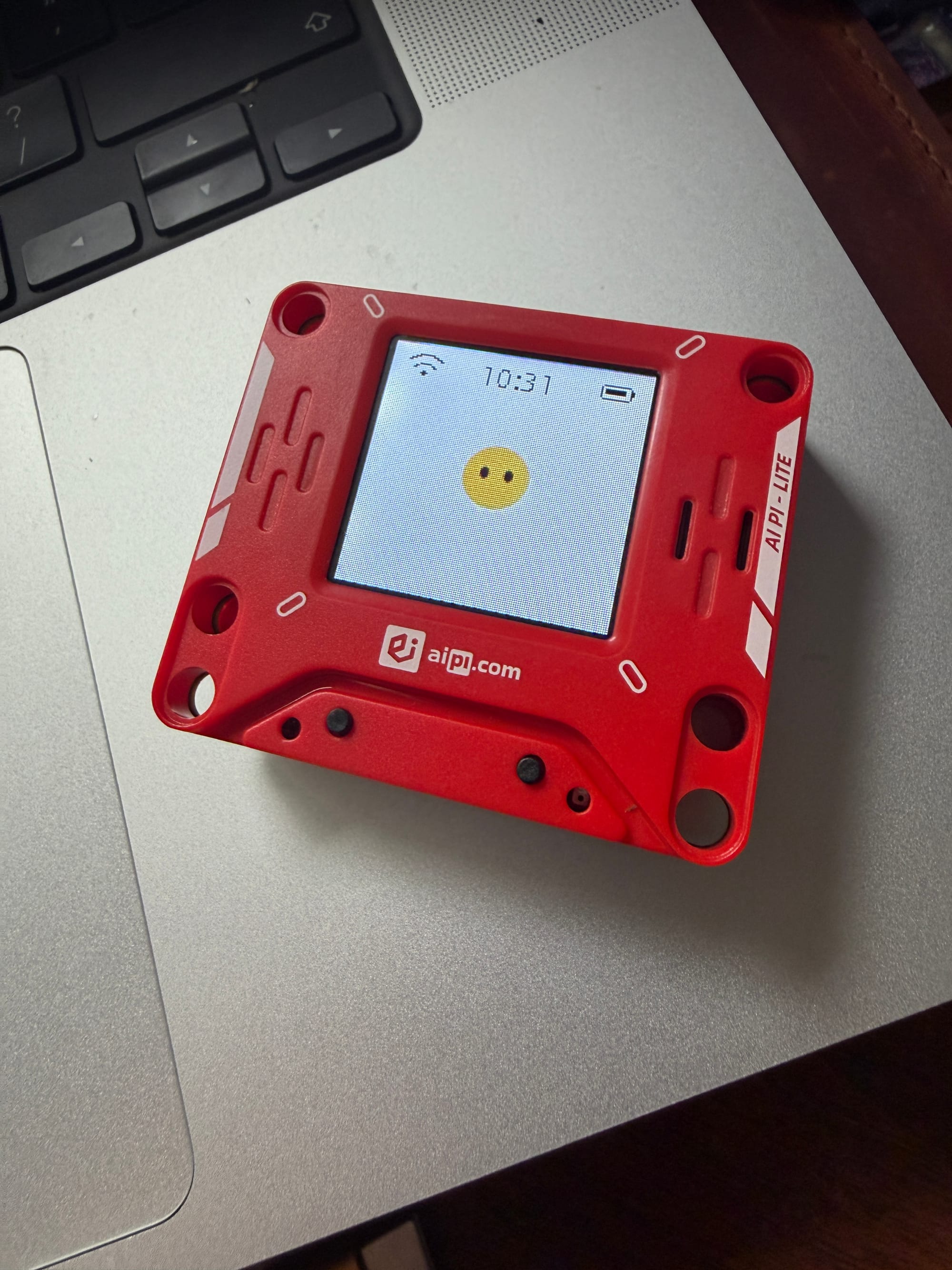
That alone makes it a known quantity. The unlocked flash makes it fully hackable. The ESP32-S3 supports secure boot and flash encryption, the two standard mechanisms for welding a device to its factory firmware. The AIPI Lite ships with neither enabled. The entire 16MB of flash is readable and writable over the USB-C port with esptool, the same utility every ESP32 hobbyist already has installed. The vendor even advertises "unencrypted flash" as a feature on the product page. I agree that it is one, though I suspect we would disagree about why.
The practical consequence is that nothing in the device is proprietary except the cloud it phones home to, and that address is just a value in the firmware. The wake word engine, the audio path, the screen UI, all of it is open code I can rebuild myself. Replace the firmware with my own build of the same project, pointed at my own server, and the vendor's cloud stops being part of the product at all. That is the whole project, and the hardware puts up no resistance.
Standing up your own brain and voice
Before touching the gadget itself, I built the thing it would talk to. The stock device streams your voice to the vendor's cloud, where their servers transcribe it, feed it to their LLM, and stream synthesized speech back. My replacement does all of that inside the house, split across two machines I already own.
The first is an always-on mini-PC, a small low-power Debian box that already runs a fleet of Docker containers around the clock. The voice stack joins that fleet as two services in a single git-managed docker-compose file. The main container is the open xiaozhi-esp32-server project, the counterpart to the firmware, run in its lightweight server-only mode: just the Python core, no database, no admin console. The second container is openedai-speech serving Piper voices for text-to-speech, CPU-only. That one publishes no port on the host at all. The voice server reaches it over the internal Docker network at an OpenAI-compatible /v1/audio/speech endpoint, and nothing else on the LAN can even see it.
Inside the server container, the audio side of a conversation runs entirely on CPU:
- Voice activity detection with SileroVAD, so the server knows when you have started and stopped talking.
- Speech-to-text with sherpa-onnx running the SenseVoice model.
- Text-to-speech handed off to the Piper container next door.
The pipeline actually starts one step earlier, on the gadget. Espressif's ESP-SR wake-word engine runs on the ESP32-S3 itself, so the microphone is not streaming anywhere until you say the wake word. Only then does audio flow to the mini-PC.
The mini-PC never runs the LLM. The server's LLM provider is just an OpenAI-compatible base URL, and mine points at vLLM on the GPU box:
LLM:
  local-vllm:
    type: openai
    base_url: http://192.168.1.x:8000/v1
That request is the only call that ever leaves the mini-PC, and it goes down the hall, not to a cloud. To the voice server it is indistinguishable from a hosted API. It is a chat-completions URL that happens to resolve to a machine in another room.
The whole composition is short enough to read in one sitting, and the shape of it matters more than the exact lines:
services:
  xiaozhi-server:
    image: ghcr.io/xinnan-tech/xiaozhi-esp32-server:server_latest
    ports:
      - "8000:8000"   # voice websocket
      - "8003:8003"   # OTA / config over HTTP
    mem_limit: 3g

  piper-tts:
    image: ghcr.io/matatonic/openedai-speech-min
    mem_limit: 1g     # no published ports; internal network only
A few deliberate choices are visible there. Both containers get hard memory caps, about 3GB for the server and 1GB for the TTS, so the voice stack can never starve the mini-PC's other jobs; the VAD, STT, and TTS models are all small enough to live comfortably inside those limits. Exactly two ports face the LAN: the websocket the device talks on, and a small HTTP endpoint for OTA and configuration. And because the entire pipeline is one human-readable YAML file in the same repo as the rest of my containers, deploying a change is edit, commit, push, pull on the box, docker compose up. The voice assistant is diffable and version-controlled like everything else.
That HTTP endpoint is how the device finds its way home. The firmware I flash later has my OTA URL baked in; on boot the gadget fetches it, is handed the websocket address, and from then on streams Opus audio both ways.
Two honest tradeoffs come with this design. First, latency: transcription and synthesis on a weak CPU add a couple of seconds to each turn. It is a noticeable pause, not a dealbreaker, and a GPU could absorb those stages later without changing anything else. Second, availability: the assistant can only answer while the GPU box is on. With it off, the gadget still wakes and the server still hears and speaks, but there is nothing on the LAN to do the thinking. If I wanted an always-answering assistant I would point the pipeline at a small model on the mini-PC itself, or just leave the GPU box running; in practice, the desktop is on whenever I actually want to talk. The tidier long-term answer is a single always-on box with enough unified memory to keep a capable model resident full time. A Framework Desktop with the large-memory AMD part is the shape of it: low idle draw, enough memory to hold a real model, and no reason to ever power it down. That is the upgrade I have my eye on, so the brain never has to sleep and the gaming GPU goes back to gaming.
What you get in exchange is complete ownership of the loop. Every stage, from the wake word in your pocket to the model weights on your desk, runs on hardware you control, and at no point does a single packet of your voice, your words, or the answers leave the home network.
Proving each step before spending the next one
The conversion stayed low-stakes because every step that costs something (a flash cycle, a build, the stock firmware itself) had a check in front of it, and nothing proceeded until the check passed. None of the checks is clever. They are the reason this was an afternoon instead of a debugging weekend.
Prove the server before the device is involved. The two containers went up first, and the whole pipeline ran end to end with no gadget attached. The server project ships a browser test client for exactly this: send it audio, watch SenseVoice transcribe it, watch the transcript go to vLLM and come back as an answer, and hear Piper read that answer aloud. One green roundtrip exercises every stage the device will depend on, and running it while watching the mini-PC's outbound traffic confirms that every hop resolves to a LAN address and nothing calls out to a cloud. Flashing against an unproven server wastes a flash cycle at best. At worst it wrecks the first-boot diagnosis, because when a fresh flash fails to connect you cannot tell whether the firmware, the network, or the server is at fault. With the server proven ahead of time, a first-boot failure has exactly one suspect.
Make the backup a verified hard stop. Before any write touches the chip, the full 16MB flash image and the small factory settings partition come off over USB-C, and "off" means verified: the byte counts match the partition sizes, a second read matches the first, and copies land somewhere that is not the machine doing the flashing. That image is the only road back to the stock device, since the vendor publishes nothing. Nothing else happens until it exists and verifies.
Gate the config before the compile. A build costs minutes, and a wrong build flashes just as cleanly as a right one, so the generated configuration gets checked before compiling. Five lines in the sdkconfig: the OTA URL points at the mini-PC, the board type matches the hardware, PSRAM is set to octal, flash size is 16MB, and the partition table is the custom one. Each of those fails quietly, as a firmware that boots wrong rather than a build that errors loudly, and grepping a text file is cheaper than diagnosing any of them after the fact.
Confirm the cut-over from both ends. The flash is only done when the serial log says so. On first boot the device should request the OTA endpoint at the mini-PC's address, get handed the WebSocket address, and connect, with zero requests to the vendor's domain anywhere in the log. Then the same story from the other side: the server's own logs (or a packet capture on the mini-PC, if you want the stronger evidence) show the device arriving. When the device's log and the server's log agree, the cut-over is real and the vendor is out of the loop.
The pattern in all four is the same: verify the current state before paying for the next step. That discipline is what turns a firmware conversion into a procedure you could hand to someone else, and it is why the reflash itself, described next, was routine.
Reflashing it onto your own server
With the server side listening, the gadget needed new firmware. Four steps: back up, build, point it at your server, flash. The order matters, and the first step is a hard gate.
Step 1: back up the stock flash, completely, before anything else. The vendor does not publish their firmware and does not support reflashing. The image sitting on the chip is the only copy of it you will ever have, and it is your only road back to a working stock device. So before the build toolchain even gets installed, the device goes on USB-C and esptool pulls the entire 16MB flash:
esptool.py read_flash 0x0 0x1000000 aipi-stock-full.binI also dumped the small factory settings partition separately, since that is where per-device provisioning lives and it is the piece you would least want to lose. Both files got checksummed and copied to two places. Only then did I let myself touch the firmware. Treat this as a precondition, not a suggestion: everything after this point is reversible only because this step happened.
Step 2: build the open firmware with ESP-IDF, and pin the version. The xiaozhi-esp32 source targets a specific ESP-IDF release (5.4 at the time I built), and the toolchain is not forgiving about it. My first build attempt used the IDF version I already had installed, and it failed on component dependencies. Installing the exact version the repo asks for made the build clean on the first try. Check the README, install that version, do not improvise here.
With the right IDF in place, the build is standard Espressif workflow: set the target to esp32s3, pick the board config that matches the hardware (16MB flash, 8MB PSRAM, ES8311 codec), and run idf.py menuconfig. Two settings matter in menuconfig. The first is the language: the firmware defaults its display and wake word to Chinese, and flipping the default-language option to en_US fixes both, worth knowing before your first flash rather than after. The second is the server address, which gets its own step.
Step 3: bake your own server address into the build. The firmware has a compile-time setting called the OTA URL. Out of the box it points at the upstream project's cloud, and on the stock device it points at the vendor's. This URL is how the device discovers everything: where to check for firmware, and where to find the voice server it should talk to. Change it to your own endpoint:
http://192.168.1.x:8003/xiaozhi/ota/(a generic LAN address; use wherever your xiaozhi-esp32-server instance answers). With that one field changed, the freshly flashed device boots up, phones home to the always-on mini-PC, gets handed the WebSocket address of the local voice pipeline, and never learns the vendor's cloud exists.
There is also a useful escape hatch built into the firmware: the server URL is actually read from a runtime setting stored on the device, with the compiled-in address as the fallback. So if you later move your server to a different machine or port, you can repoint the device without rebuilding or reflashing anything. The baked-in URL just has to be right once, on first boot.
Step 4: flash it. idf.py build, then idf.py flash over the same USB-C port the backup came from. With no secure boot and no flash encryption in play, there are no fuses to fight and no signatures to defeat. The device takes the new image like any dev board would. A minute later the little screen came up in English, the device joined the home network, and the first thing it contacted was my mini-PC.
If anything ever goes sideways, the recovery path is the mirror image: esptool.py write_flash 0x0 aipi-stock-full.bin restores the device to the exact state it shipped in. That backup is what makes the whole project low-stakes. You are never more than one command away from stock.
Living with it
The finished loop is worth describing plainly. I say the wake word. The gadget lights up, having heard me entirely on its own silicon, no audio leaving the device until it knows I am talking to it. The mini-PC takes the stream, trims the silence, and turns my words into text. The GPU box across the room composes an answer with an open model running under vLLM. Piper renders the reply into a voice, and a second or two later the little speaker on my desk says it out loud. I can watch the whole conversation as traffic between three machines I own. Nothing else is listening because there is nothing else in the path.
That is the point. This class of gadget normally ships as a microphone with a subscription attached, and every question you ask it becomes a row in someone else's database. This one now answers from a model I chose, with a voice I chose, through a server I run, and if the vendor's cloud shut down tomorrow the device would not notice. The stock firmware image is backed up in full, so the factory path is still there if I ever want it, but I doubt I will.
A pocket gadget that cost about as much as a takeout order now runs a voice assistant with better privacy properties than anything you can buy at retail. The hardware was capable all along, and nothing about it ever depended on the vendor's cloud. An unlocked ESP32-S3 with a decent codec is a general-purpose voice terminal, and the open firmware and server projects do the heavy lifting of making it one.
So it sits on the desk, and it works. I ask, my own machines answer, and the conversation never leaves the house. That is what owning a device is supposed to feel like.
Build your own
The firmware config and the server stack are on GitHub if you want to replicate this: github.com/Heretikio/aipi-lite-selfhost. It has both ESP-IDF config files, the Docker compose stack, an annotated config template, and step-by-step flashing and validation guides. Bring your own OpenAI-compatible LLM endpoint; everything else in the pipeline runs local.
Comments
// Comments are reviewed before appearing. No spam. No noise.