
Switch the internet off. Now open a browser and read the full English Wikipedia, images and all. Search every question ever asked on Stack Overflow. Browse the entire Project Gutenberg shelf, watch TED talks, work through Khan Academy. Pull up a guide to emergency surgery, or which wild plants are safe to eat, or how to can this year's harvest so it keeps through winter. Close to every practical survival skill, written down and searchable. None of it touches the network. All of it lives on one small computer on a shelf, drawing a few watts, and it answers instantly.
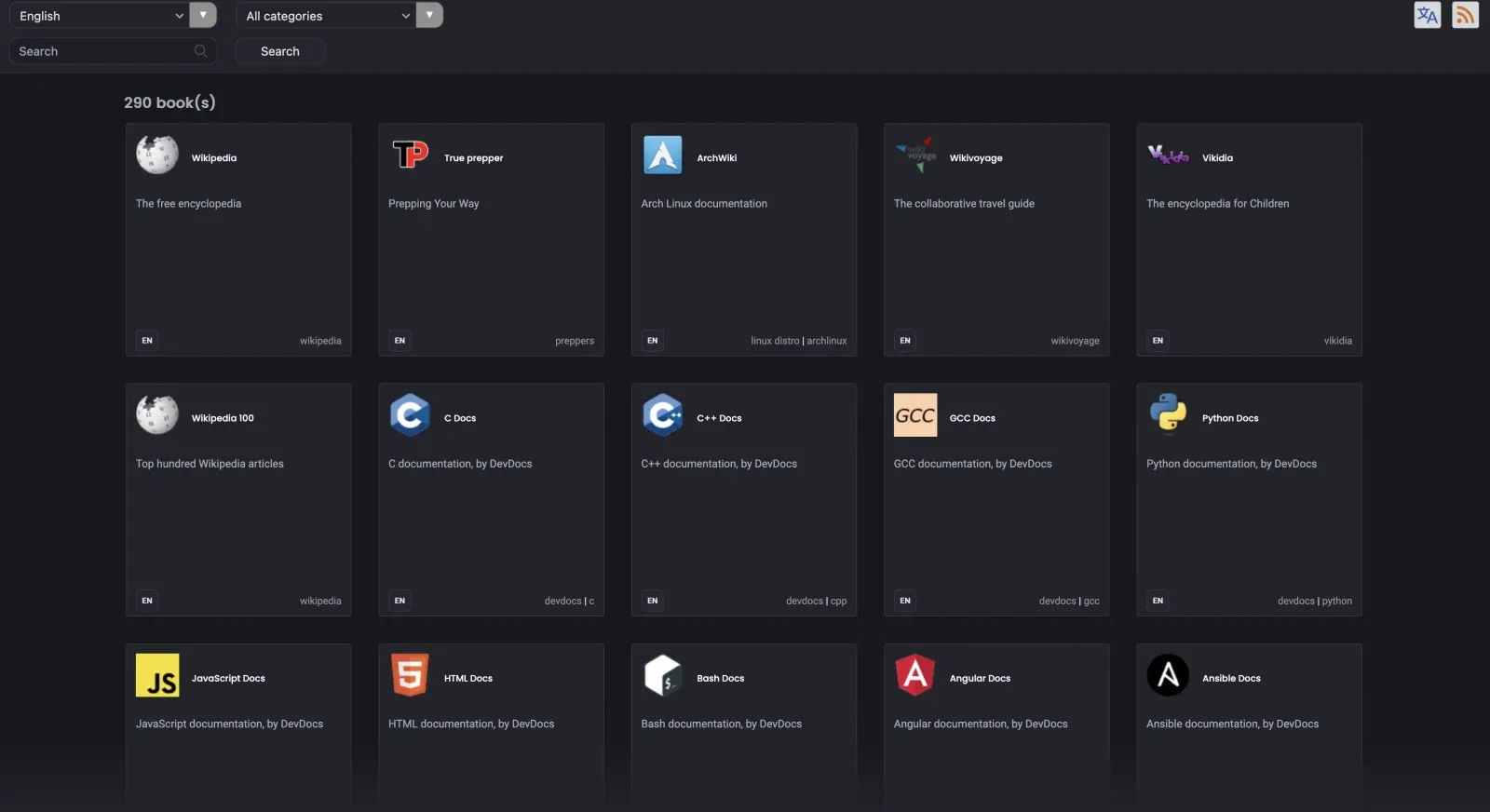
That is the finished thing: 290 sources, 751GB, served on a home network at a plain address like http://arcana.local, quietly keeping itself current. Out here on a ridgetop where the internet comes and goes and cell service is more of a suggestion than a promise, having the sum of human knowledge sit on a shelf that nobody can paywall, alter, or switch off is worth more than I expected. It does not depend on a signal, a subscription, or some company deciding to keep a server alive. It is just mine.

What it actually does for you
The reason this matters is not the file count. It is what the file count means when help is far away.
If someone gets a bad cut or a break out here, or an animal is sick and the vet is an hour off, I am not always in a spot where I can just call somebody. Having WikEM, a full medical encyclopedia, and a shelf of first-aid and field references sitting local means the reference is there whether or not there is a bar of signal. When a generator or a water pump or some tool quits at the wrong moment, iFixit repair guides and the manuals are right there too, no searching around for a page that may or may not load. Around those sit the homestead trades: gardening, food preservation, water systems, wiring, appropriate technology. The practical knowledge you actually reach for when you are the one who has to fix it.
Then there are the kids. The whole of Wikipedia, a children's encyclopedia, and all of Khan Academy, offline. No feed, no ads, nothing trying to hold their attention hostage. Just the library, open, when they are curious about something.
The thread running through all of it is quiet. This is not doomsday prepping so much as peace of mind. When a storm takes the line down, when the grid blinks, when a website simply disappears the way websites do, the library keeps working. It does not notice. That steadiness is the whole point.
How it goes together
If you want to build your own, here is the path we took, high level. A capable person could follow it without much trouble.
The hardware is one box. A Raspberry Pi 500+ with a 4TB NVMe drive tucked into its internal M.2 slot. That is the entire appliance: keyboard, computer, and four terabytes of storage in a single unit, running off a stock USB-C supply. I put the whole thing together for under $400, because I grabbed the Pi and the drive early, at good prices, rather than the inflated numbers they run for now. Even at today's prices it is not exotic hardware. It is small, it sips power, and you could leave it on a battery for a long time.
The drive I used is a Crucial P3 Plus 4TB (CT4000P3PSSD8), a plain consumer NVMe stick that seats in the Pi 500+'s internal M.2 slot, which is the whole reason to buy the "+" model. Any 4TB NVMe of that class will do. Flash Raspberry Pi OS (this build ran Debian 13 "Trixie") straight onto the drive and boot it once before you touch anything, so you know the machine is healthy first.
Use the whole drive. This is the one careful step, so do it deliberately. Raspberry Pi OS still lays its system down on an old MBR partition table, a holdover from the SD-card days, and MBR cannot address past about 2TB. So flashing the OS onto a 4TB drive leaves half of it stranded, unusable free space with no way to reach it. The fix is to convert the partition table to GPT, which has no such ceiling, and you do it in place.
First, back everything up. The conversion is reversible only if you captured the old layout before you started. On the Pi:
mkdir -p ~/phase1-backup && cd ~/phase1-backup

# the partition table, both as a text dump and as a raw image of the first 8MB
sudo sfdisk -d /dev/nvme0n1 > nvme-mbr-sfdisk.txt
sudo dd if=/dev/nvme0n1 of=nvme-first-8mb.bin bs=1M count=8

# the current IDs, and the two files the boot chain reads
blkid > blkid-before.txt
sudo cp /boot/firmware/cmdline.txt cmdline.txt.mbr-bak
sudo cp /etc/fstab fstab.mbr-bak
Copy that whole phase1-backup folder off the Pi to another machine before continuing. Now do the conversion in place. On the Pi, /usr/sbin is not always on a non-interactive shell's PATH, so put it there first (otherwise sgdisk and friends may not be found):
export PATH=$PATH:/usr/sbin:/sbin
sudo apt install -y gdisk cloud-guest-utils
sudo sgdisk --mbrtogpt /dev/nvme0n1
You will see Found invalid GPT and valid MBR; converting MBR to GPT format ... The operation has completed successfully. The MBR-style PARTUUIDs the boot chain used (something like 237587e0-01 and -02) are now stale. GPT assigns each partition a full GUID, and the Pi will not boot until you write the new ones into two files. Read the new PARTUUIDs:
sudo blkid /dev/nvme0n1p1 /dev/nvme0n1p2That prints the boot partition (p1) and root partition (p2) PARTUUIDs. Put them where the firmware and the mounter expect them.
Gotcha worth knowing before it bites you. Writing the GPT makes the kernel re-read the partition table, which quietly unmounts the non-busy vfat boot partition at/boot/firmware. If your next edit fails with "No such file or directory," that is why. Remount it by device and continue:sudo mount /dev/nvme0n1p1 /boot/firmware.
Second gotcha: there are two files namedcmdline.txt. The one on the root filesystem at/boot/cmdline.txtis a stub that says "DO NOT EDIT." The effective file the firmware actually reads lives on the vfat partition at/boot/firmware/cmdline.txt. Edit that one.
In /boot/firmware/cmdline.txt, replace the root=PARTUUID=... value with the new p2 PARTUUID (it is all one line, do not add newlines):
root=PARTUUID=<new-p2-partuuid>In /etc/fstab, update both lines so /boot/firmware points at the new p1 PARTUUID and / points at the new p2 PARTUUID:
PARTUUID=<new-p1-partuuid>  /boot/firmware  vfat  defaults  0  2
PARTUUID=<new-p2-partuuid>  /               ext4  defaults,noatime  0  1
Verify before you commit. All three of these should come back clean:
sudo sgdisk -v /dev/nvme0n1     # "No problems found"
findmnt --verify                # both PARTUUIDs resolve, 0 errors
sudo blkid                      # kernel now shows the new GPT PARTUUIDs
Then reload systemd and reboot. Schedule the reboot decoupled from your SSH session so it survives the connection dropping:
sudo systemctl daemon-reload
sudo systemd-run --on-active=3 systemctl reboot
It comes back up booting from GPT, and the resize finishes on its own. The Debian Pi image ships cloud-init, whose growpart and resizefs modules run on every boot; the instant GPT exposes the free space past the old 2TB ceiling, cloud-init grows the partition and then the filesystem to fill the drive. If your image does not do this for you, run it by hand once:
sudo growpart /dev/nvme0n1 2
sudo resize2fs /dev/nvme0n1p2
Either way you end up with the full 4TB as one pool. df -h / should show roughly 3.6T total.
Serve it. The library server is a program called kiwix-serve, which reads the offline archive files and puts them on the web. I run it behind a small web server (Caddy) so the whole thing lives at a friendly local address instead of a port number, and so it stays fast with compression. Lock the server program down to an unprivileged user and it runs happily in the background as a service that starts itself on boot.
apt ships an older kiwix-tools, so grab the current static build (it is a self-contained tarball, no dependencies) and drop it under /opt:
cd /tmp
curl -fLO https://download.kiwix.org/release/kiwix-tools/kiwix-tools_linux-aarch64.tar.gz
tar xf kiwix-tools_linux-aarch64.tar.gz
sudo mkdir -p /opt/kiwix/3.8.2
sudo cp kiwix-tools_linux-aarch64-*/* /opt/kiwix/3.8.2/
sudo ln -sfn /opt/kiwix/3.8.2 /opt/kiwix/current
Make a locked-down system user for it and lay out the library directory:
sudo useradd --system --home /srv/kiwix --shell /usr/sbin/nologin kiwix
sudo mkdir -p /srv/kiwix/zim/.staging
sudo chown -R kiwix:kiwix /srv/kiwix
Install the hardened systemd unit at /etc/systemd/system/kiwix-serve.service. It binds to loopback only (Caddy is the front door), runs as the kiwix user, and turns on most of systemd's sandboxing:
[Unit]
Description=Kiwix ZIM library server
Documentation=https://kiwix-tools.readthedocs.io/en/latest/kiwix-serve.html
After=network-online.target
Wants=network-online.target

[Service]
Type=exec
User=kiwix
Group=kiwix
ExecStart=/opt/kiwix/current/kiwix-serve --library /srv/kiwix/library.xml --address 127.0.0.1 --port 8080 --threads 8 --monitorLibrary --nodatealiases --blockexternal
ExecReload=/bin/kill -HUP $MAINPID
Restart=on-failure
RestartSec=2
TimeoutStopSec=15

# --- hardening: kiwix-serve is a read-only reader; nothing under / is writable ---
NoNewPrivileges=yes
ProtectSystem=strict
ProtectHome=yes
PrivateTmp=yes
PrivateDevices=yes
ProtectClock=yes
ProtectHostname=yes
ProtectKernelTunables=yes
ProtectKernelModules=yes
ProtectKernelLogs=yes
ProtectControlGroups=yes
ProtectProc=invisible
RestrictNamespaces=yes
RestrictRealtime=yes
RestrictSUIDSGID=yes
LockPersonality=yes
RestrictAddressFamilies=AF_INET AF_INET6 AF_NETLINK
SystemCallArchitectures=native
SystemCallFilter=@system-service
SystemCallErrorNumber=EPERM
CapabilityBoundingSet=
AmbientCapabilities=

[Install]
WantedBy=multi-user.target
The one non-obvious line is RestrictAddressFamilies. Leave AF_NETLINK off and kiwix-serve crash-loops with getifaddrs: Address family not supported by protocol, because it enumerates network interfaces over a netlink socket to resolve --address. Include AF_NETLINK and it runs clean, with the sandbox otherwise fully on.
While you are here, drop in the small VM tuning file at /etc/sysctl.d/60-kiwix-sysctl.conf (the server memory-maps random reads off NVMe on a 16GB box, so you want it to hold the page and inode cache rather than swap):
# Tuning for kiwix-serve: mmap'd random reads off NVMe on a 16GB box.
# Prefer reclaiming page cache over swapping the small resident set; retain the
# dentry/inode cache across a library of many ZIM files.
vm.swappiness = 10
vm.vfs_cache_pressure = 50
Now the front door. Caddy is in Debian's own repo, so no third-party source is needed:
sudo apt install -y caddyReplace /etc/caddy/Caddyfile with this. It serves every Host on port 80 and reverse-proxies to the loopback kiwix-serve, with compression on:
# arcana Kiwix front door. Serves every Host on :80 -> loopback kiwix-serve.
# .local names cannot get an ACME cert, so this stays HTTP; Pangolin terminates
# TLS for the external hostname upstream.
:80 {
	encode zstd gzip
	reverse_proxy 127.0.0.1:8080
}
Enable both, apply the sysctl, and you have a running (empty) library at http://arcana.local:
sudo sysctl --system
sudo systemctl daemon-reload
sudo systemctl enable --now kiwix-serve.service caddy.service
Load it and keep it fresh. Kiwix publishes a catalog of hundreds of archives: Wikipedia in various sizes, Wiktionary, Wikisource, dozens of Stack Exchange sites, programming references, the medical and repair and homestead shelves, Gutenberg, TED, Khan Academy. You pick the titles you want and list them in a simple manifest file. A small script feeds that manifest to a downloader (aria2) which pulls each archive with checksum verification, and a weekly timer re-runs it every Sunday so anything that has been updated upstream refreshes on its own. Set it once and it tends itself.
Install the downloader:
sudo apt install -y aria2The manifest is /srv/kiwix/families.conf, one line per archive family, in the form https://download.kiwix.org/zim/<project>/|<family>. The script always fetches the newest dated dump of each family, so you never pin a stale date. A representative slice spanning the shelves:
https://download.kiwix.org/zim/wikipedia/|wikipedia_en_all_maxi
https://download.kiwix.org/zim/stack_exchange/|stackoverflow.com_en_all
https://download.kiwix.org/zim/other/|wikem_en_all_maxi
https://download.kiwix.org/zim/ifixit/|ifixit_en_all
https://download.kiwix.org/zim/other/|khanacademy_en_all
https://download.kiwix.org/zim/gutenberg/|gutenberg_en_all
Add as many lines as you like; browse the catalog at https://download.kiwix.org/zim/ to find the exact project folders and family names. One thing that will bite you: a few families do not live where you would guess (for example wikispecies_en_all_maxi sits under zim/other/, not zim/wikipedia/). If a line matches nothing, check the folder.
Install the update script at /usr/local/bin/kiwix-zim-update.sh. It reads the manifest, finds the newest dump per family, downloads it multi-mirror with checksum verification via aria2c, does an atomic swap so a half-downloaded file is never served, guards free space, then rebuilds library.xml and hot-reloads the server:
#!/usr/bin/env bash
# /usr/local/bin/kiwix-zim-update.sh
# Keep each ZIM family listed in /srv/kiwix/families.conf at its newest published
# dump. Multi-mirror + checksum-verified via aria2c/Metalink. Atomic swap, no
# partial-file serving, free-space guarded. Safe to run repeatedly and concurrently
# (flock). Rebuilds library.xml and hot-reloads kiwix-serve after each change.
set -euo pipefail
export PATH="$PATH:/usr/sbin:/sbin"

LIB_DIR="/srv/kiwix/zim"
LIBRARY="/srv/kiwix/library.xml"
STAGING="${LIB_DIR}/.staging"
FAMILIES_CONF="/srv/kiwix/families.conf"
KIWIX_MANAGE="/opt/kiwix/current/kiwix-manage"
MARGIN_BYTES=$((10 * 1024 * 1024 * 1024))   # keep 10 GiB headroom after a download
LOG="/var/log/kiwix-zim-update.log"

mkdir -p "$STAGING"
exec 9>/run/lock/kiwix-zim-update.lock
flock -n 9 || { echo "another kiwix-zim-update run in progress; exiting"; exit 0; }

log()  { printf '%s %s\n' "$(date -Is)" "$*" | tee -a "$LOG" >&2; }
avail_bytes() { df -B1 --output=avail "$1" | tail -n1 | tr -dc '0-9'; }

rebuild_library() {
  local newlib="${LIBRARY%/*}/.library.new" z   # build in the library's OWN dir so kiwix-manage stores paths as zim/<file> (relative base = /srv/kiwix)
  rm -f "$newlib"
  shopt -s nullglob
  for z in "${LIB_DIR}"/*.zim; do "$KIWIX_MANAGE" "$newlib" add "$z" >/dev/null; done
  shopt -u nullglob
  if [ -f "$newlib" ]; then
    mv -f "$newlib" "$LIBRARY"
  else
    printf '<?xml version="1.0"?>\n<library version="20110515"/>\n' > "$LIBRARY"
  fi
  systemctl reload kiwix-serve.service 2>/dev/null || pkill -HUP -x kiwix-serve 2>/dev/null || true
}

update_family() {
  local dir_url="${1%/}/" family="$2" newest
  newest=$(curl -fsSL "$dir_url" | grep -oE "${family}_[0-9]{4}-[0-9]{2}\.zim" | sort -u | tail -n1) || true
  [ -n "$newest" ] || { log "$family: no match at $dir_url (dir wrong or family renamed)"; return 0; }
  if [ -e "${LIB_DIR}/${newest}" ]; then log "$family: already current ($newest)"; return 0; fi
  log "$family: newest published is $newest"

  local meta4="${STAGING}/${newest}.meta4"
  curl -fsSL "${dir_url}${newest}.meta4" -o "$meta4"

  local size need avail
  size=$(sed -n 's:.*<size>\([0-9]\+\)</size>.*:\1:p' "$meta4" | head -n1)
  need=$(( ${size:-0} + MARGIN_BYTES ))
  avail=$(avail_bytes "$STAGING")
  if [ "$avail" -lt "$need" ]; then
    log "$family: SKIP low space (need $((need/1024/1024)) MiB, have $((avail/1024/1024)) MiB)"
    rm -f "$meta4"; return 0
  fi

  log "$family: downloading $newest ($(( ${size:-0}/1024/1024 )) MiB) via aria2c"
  aria2c --dir="$STAGING" --continue=true --max-connection-per-server=4 \
    --split=8 --min-split-size=10M --check-integrity=true \
    --allow-overwrite=false --auto-file-renaming=false \
    --console-log-level=warn --summary-interval=0 "$meta4"

  mv -f "${STAGING}/${newest}" "${LIB_DIR}/${newest}"
  rm -f "$meta4"
  log "$family: verified and staged $newest"

  local old
  for old in "${LIB_DIR}/${family}"_[0-9][0-9][0-9][0-9]-[0-9][0-9].zim; do
    [ -e "$old" ] || continue
    [ "$(basename "$old")" != "$newest" ] && { rm -f "$old"; log "$family: removed old $(basename "$old")"; }
  done

  rebuild_library
  log "$family: now serving $newest"
}

[ -f "$FAMILIES_CONF" ] || { log "no $FAMILIES_CONF present, nothing to do"; exit 0; }

while IFS= read -r raw; do
  line="${raw%%#*}"
  line="$(printf '%s' "$line" | tr -d '[:space:]')"
  [ -z "$line" ] && continue
  url="${line%%|*}"; fam="${line##*|}"
  [ -n "$url" ] && [ -n "$fam" ] || { log "bad manifest line: $raw"; continue; }
  update_family "$url" "$fam" || log "ERROR updating $fam"
done < "$FAMILIES_CONF"

log "update run complete"
One subtlety in that script is worth calling out, because it cost me an evening: kiwix-manage records each ZIM's path relative to wherever the library file sits when you write it. Build the temp library inside the zim directory and then move it up, and every path stores as a bare filename, so the server looks in the wrong place and serves zero books despite the files being right there. The fix is to build the temp library in the library's own directory (${LIBRARY%/*}/.library.new) so paths store as zim/<file> and survive the move.
Make it executable, then install the oneshot service and the weekly timer:
sudo chmod +x /usr/local/bin/kiwix-zim-update.sh/etc/systemd/system/kiwix-zim-update.service:
[Unit]
Description=Update Kiwix ZIM library to newest published dumps
After=network-online.target kiwix-serve.service
Wants=network-online.target

[Service]
Type=oneshot
User=kiwix
Group=kiwix
Nice=10
IOSchedulingClass=idle
ExecStart=/usr/local/bin/kiwix-zim-update.sh
TimeoutStartSec=infinity/etc/systemd/system/kiwix-zim-update.timer:
[Unit]
Description=Weekly Kiwix ZIM update check

[Timer]
OnCalendar=Sun 03:00
Persistent=true
RandomizedDelaySec=2h

[Install]
WantedBy=timers.target
Enable the weekly timer, then kick off the first full pull by hand. Use --no-block, because a plain start on an infinite-timeout oneshot blocks your shell for the entire multi-hour download:
sudo systemctl daemon-reload
sudo systemctl enable --now kiwix-zim-update.timer
sudo systemctl start --no-block kiwix-zim-update.service
tail -f /var/log/kiwix-zim-update.log
The heavy hitters, for a sense of scale: Wikipedia with images is about 116GB, Gutenberg 207GB, Khan Academy 168GB, TED 83GB, Stack Overflow 75GB. The first full pull, all 751GB with verification, ran overnight in about ten hours over plain WiFi. No wired connection needed, which surprised me.
Easy on the eyes, and reachable from anywhere
Reading a wall of white Wikipedia at night was the one rough edge, and the server has no dark mode of its own. The feature has been requested for years and never landed. So I built one and open-sourced it: kiwix-dark (github.com/Heretikio/kiwix-dark). It slips a small stylesheet into every page the server sends, follows your device's light or dark setting or lets you force either with a toggle, and remembers your choice as you move around. Light mode stays exactly as it shipped.
The mechanism is a response-body rewrite that injects the stylesheet into every page, which Caddy's stock Debian build cannot do. The repo's examples use nginx as a thin injector in front of kiwix-serve, using sub_filter to splice the stylesheet in just before </head>:
server {
    listen 8090;
    location / {
        proxy_pass http://127.0.0.1:8080;
        sub_filter_once on;
        sub_filter_types text/html;
        sub_filter '</head>' '<link rel="stylesheet" href="/kiwix-dark.css"></head>';
    }
    location = /kiwix-dark.css {
        alias /opt/kiwix-dark/kiwix-dark.css;
    }
}
Point Caddy at that injector port instead of straight at kiwix-serve, or follow the repo README, which has the full drop-in and the toggle script. It is non-destructive: light mode is untouched, and pulling the injector reverts everything.
The box lives on the home network by default, which is the point. But I did not want it locked to the house. It sits behind Pangolin, a self-hosted reverse proxy that runs a private tunnel from a small cloud server back to the Pi at home, so whenever I am away and have any signal at all, my phone reaches the whole library through a login only I hold. Nothing on the Pi is ever exposed to the open internet, and there is no port forwarding or static IP to wrestle with. The library stays home, and it comes with me.
If you already run Pangolin, publishing this is three steps in the dashboard. Add an HTTP resource, point its target at the Pi's LAN address on the Caddy port (http://<pi-lan-ip>:80), and give it a subdomain. Then turn on SSO for that resource so it sits behind a login. Pangolin terminates TLS for the public hostname upstream, which is why the Pi's own Caddy can stay plain HTTP on the LAN. The Newt tunnel from the Pi means nothing has to be port-forwarded or exposed directly.
Why I keep it
I have gotten used to the idea that knowledge is something you rent. You look it up, the answer arrives from somewhere, and you trust that somewhere will still be there tomorrow. Out here that trust is not always warranted, and honestly I am not sure it should be anywhere.
And it is not only outages I have started to think about. More and more, the record itself moves. Public datasets get taken down, official pages go offline or come back quietly edited, and a reference that said one thing last year now says another or is simply gone. When the record can be revised or pulled after the fact, keeping your own copy stops being paranoia and turns into basic hygiene. The snapshot on my shelf is frozen at the moment I pulled it. Nobody can reach back and change what it says, and if I need to know what a page held before it was altered, I still have it.
This is the other way. The library sits on a shelf, powered by a few watts, owned outright. When the line goes down or the grid blinks or a site I relied on quietly vanishes, none of it matters. The encyclopedia still opens. The repair guide still loads. The kids can still fall down whatever rabbit hole caught them that afternoon. Nobody can paywall it, nobody can alter it, and nobody can take it offline. That is a kind of self-reliance I did not know I wanted until I had it, and now I would not give it back.
Comments
// Comments are reviewed before appearing. No spam. No noise.